顯示具有 javascript 標籤的文章。 顯示所有文章

2026/2/9

Cytoscape.js

Cytoscape.js 是一個處理資料視覺化的 javascript library,當我們要對資料關係進行可視化顯示時,例如社交網路關係或網路拓樸圖時,Cytoscape.js 是個不錯的選擇。

Cytoscape 和 Cytoscape.js 是兩個完全獨立不同的軟體

  • Cytoscape

    • 使用 Java 語言編寫的用於網絡可視化的桌面應用程序

    • 需要安裝 Java SDK 才能使用

    • 用於大型網絡分析和可視化的高性能應用程序

  • Cytoscape.js

    • 用於網絡可視化的 javascript library,本身不是一個完整的 Web Application

    • 可以在大多數瀏覽器上使用

    • 不需要 plugin 即可運行

    • 需要編寫程式來建構 Web Application

    • 支援 Extensions

    • 基於 CSS 將資料映射到元件屬性

sample1

建立一個 圓形排列 的 4 個節點 (A, B, C, D),節點之間有箭頭連線,點擊節點會有事件

<!DOCTYPE html>
<html lang="zh-Hant">
<head>
    <meta charset="UTF-8">
    <title>test1</title>
    <script src="https://unpkg.com/cytoscape/dist/cytoscape.min.js"></script>
    <style>
        #cy {
            width: 800px;
            height: 600px;
            border: 1px solid #ccc;
            display: block;
        }
    </style>
</head>
<body>
    <h2>test1</h2>
    <div id="cy"></div>

    <script>
        const cy = cytoscape({
            container: document.getElementById('cy'),

            elements: [
                { data: { id: 'a', label: '節點 A' } },
                { data: { id: 'b', label: '節點 B' } },
                { data: { id: 'c', label: '節點 C' } },
                { data: { id: 'd', label: '節點 D' } },
                { data: { id: 'ab', source: 'a', target: 'b' } },
                { data: { id: 'bc', source: 'b', target: 'c' } },
                { data: { id: 'cd', source: 'c', target: 'd' } },
                { data: { id: 'da', source: 'd', target: 'a' } }
            ],

            style: [
                {
                    selector: 'node',
                    style: {
                        'background-color': '#0074D9',
                        'label': 'data(label)',
                        'color': '#fff',
                        'text-valign': 'center',
                        'text-outline-width': 2,
                        'text-outline-color': '#0074D9'
                    }
                },
                {
                    selector: 'edge',
                    style: {
                        'width': 3,
                        'line-color': '#AAAAAA',
                        'target-arrow-color': '#AAAAAA',
                        'target-arrow-shape': 'triangle',
                        'curve-style': 'bezier',
                    }
                }
            ],

            layout: {
                name: 'circle'
            }
        });

        // 點擊事件
        cy.on('tap', 'node', function(evt) {
            let node = evt.target;
            console.log('你點了節點: ' + node.id());
        });
    </script>
</body>
</html>

sample2

流程圖,layout 調整為 dagre extension。

使用時要引用 dagre library 及 Cytoscape.js 的 extension

dagre 正是 Cytoscape.js 常用來畫flowchart或 directed graph 的 layout。適合做 flowchart, network topology, workflow

<!DOCTYPE html>
<html lang="zh-Hant">
<head>
    <meta charset="UTF-8">
    <title>Cytoscape.js Flowchart</title>
    <script src="https://unpkg.com/cytoscape/dist/cytoscape.min.js"></script>
    <script src="https://unpkg.com/dagre/dist/dagre.min.js"></script>
    <script src="https://unpkg.com/cytoscape-dagre/cytoscape-dagre.js"></script>
    <style>
        #cy {
            width: 800px;
            height: 600px;
            border: 1px solid #ccc;
        }
    </style>
</head>
<body>
    <h2>flowchart</h2>
    <div id="cy"></div>

    <script>
        cytoscape.use(cytoscapeDagre);

        const cy = cytoscape({
            container: document.getElementById('cy'),

            elements: [
                { data: { id: 'start', label: '開始' } },
                { data: { id: 'step1', label: '步驟 1' } },
                { data: { id: 'step2', label: '步驟 2' } },
                { data: { id: 'decision', label: '判斷 ?' } },
                { data: { id: 'end', label: '結束' } },
                { data: { id: 's1', source: 'start', target: 'step1' } },
                { data: { id: 's2', source: 'step1', target: 'step2' } },
                { data: { id: 's3', source: 'step2', target: 'decision' } },
                { data: { id: 's4', source: 'decision', target: 'end' } },
                { data: { id: 's5', source: 'decision', target: 'step1' } }
            ],

            style: [
                {
                    selector: 'node',
                    style: {
                        'shape': 'round-rectangle',
                        'background-color': '#28a745',
                        'label': 'data(label)',
                        'color': '#fff',
                        'text-valign': 'center',
                        'text-outline-width': 2,
                        'text-outline-color': '#28a745'
                    }
                },
                {
                    selector: 'node[id="decision"]',
                    style: {
                        'shape': 'diamond',
                        'background-color': '#ffc107',
                        'text-outline-color': '#ffc107'
                    }
                },
                {
                    selector: 'edge',
                    style: {
                        'width': 2,
                        'line-color': '#555',
                        'target-arrow-color': '#555',
                        'target-arrow-shape': 'triangle',
                        'curve-style': 'bezier',
                    }
                }
            ],

            layout: {
                name: 'dagre',
                // rankDir: 'TB'  // top-to-bottom
                rankDir: 'LR' // 由左到右 排列
            }
        });
    </script>
</body>
</html>

sample3

鐵路模擬,增加火車在鐵軌上移動的動畫

<!DOCTYPE html>
<html lang="zh-Hant">
<head>
    <meta charset="UTF-8">
    <title>Cytoscape.js Railway</title>
    <script src="https://unpkg.com/cytoscape/dist/cytoscape.min.js"></script>
    <style>
        #cy {
            width: 800px;
            height: 600px;
            border: 1px solid #ccc;
        }
    </style>
</head>
<body>
    <h2>Railway</h2>
    <div id="cy"></div>

    <script>
        const cy = cytoscape({
            container: document.getElementById('cy'),

            elements: [
                { data: { id: 'station1', label: '車站 1' } },
                { data: { id: 'station2', label: '車站 2' } },
                { data: { id: 'station3', label: '車站 3' } },
                { data: { id: 'checkpoint4', label: '檢查點 4' } },
                { data: { id: 'checkpoint5', label: '檢查點 5' } },
                { data: { id: 'checkpoint6', label: '檢查點 6' } },
                { data: { id: 's1', source: 'station1', target: 'station2' } },
                { data: { id: 's2', source: 'station2', target: 'station3' } },
                { data: { id: 's3', source: 'station2', target: 'checkpoint4' } },
                { data: { id: 's4', source: 'checkpoint4', target: 'checkpoint5' } },
                { data: { id: 's5', source: 'checkpoint5', target: 'station3' } },
                { data: { id: 's6', source: 'checkpoint5', target: 'checkpoint6' } },

                // 列車節點
                { data: { id: 'train1', label: '🚆' }, classes: 'train' }
            ],

            style: [
                {
                    selector: 'node',
                    style: {
                        'shape': 'ellipse',
                        'background-color': '#0074D9',
                        'label': 'data(label)',
                        'color': '#fff',
                        'text-valign': 'center',
                        'text-outline-width': 2,
                        'text-outline-color': '#0074D9'
                    }
                },
                {
                    selector: 'node[id^="station"]',
                    style: {
                        'shape': 'round-rectangle',
                        'background-color': '#17a2b8',
                        'text-outline-color': '#17a2b8'
                    }
                },
                {
                    selector: 'node.train',
                    style: {
                        'background-color': 'red',
                        'shape': 'ellipse',
                        'label': 'data(label)',
                        'font-size': 24,
                        'width': 30,
                        'height': 30
                    }
                },
                {
                    selector: 'edge',
                    style: {
                        'width': 2,
                        'line-color': '#555',
                        'target-arrow-color': '#555',
                        'target-arrow-shape': 'triangle'
                    }
                }
            ],

            layout: {
                name: 'breadthfirst',
                directed: true,
                padding: 20
            }
        });

        function moveAlongEdge(train, fromNode, toNode, duration, callback) {
            const start = fromNode.position();
            const end = toNode.position();
            const startTime = performance.now();

            function animate(now) {
                const elapsed = now - startTime;
                const t = Math.min(elapsed / duration, 1); // 0~1
                const x = start.x + (end.x - start.x) * t;
                const y = start.y + (end.y - start.y) * t;
                train.position({ x, y });

                if (t < 1) {
                    requestAnimationFrame(animate);
                } else if (callback) {
                    callback();
                }
            }

            requestAnimationFrame(animate);
        }

        function moveTrain(path) {
            let i = 0;
            const train = cy.getElementById('train1');

            function step() {
                if (i >= path.length - 1) return;
                const fromNode = cy.getElementById(path[i]);
                const toNode = cy.getElementById(path[i + 1]);

                moveAlongEdge(train, fromNode, toNode, 2000, () => {
                    i++;
                    step();
                });
            }

            step();
        }

        // 定義路徑
        const route = ['station1', 'station2', 'checkpoint4', 'checkpoint5', 'station3'];

        // 初始化列車位置
        cy.getElementById('train1').position(cy.getElementById(route[0]).position());

        // 2 秒後啟動列車
        setTimeout(() => moveTrain(route), 2000);
    </script>
</body>
</html>

2025/10/13

如何使用 vue3-draggable-next esm module

vue3-draggable-next 是 draggable 套件的 vue3 版本,預設在 dist 裡面,只提供 umd 及 commonjs module,如果要在 browser 裡面,透過 esm 的方式 import module,必須要先自己製作一個簡單的 esm js

vuedraggable.umd.js 檔案,就跟 vuedraggable.umd.min.js 放在同一個目錄

// 確保 UMD 先載入(它會掛在 window.vuedraggable)
import "./vuedraggable.umd.min.js";
// 把全域變數 export 出去,提供 ESM 的 default
export default window.vuedraggable;

然後在 html 裡面,先以 importmap 方式列出 import list

因為 draggable 有使用到 sortablejs,故這邊要先放到 import list

另外在下面的 module 裡面,要先將 Vue 及 Sortable 掛載到全域變數裡面,因為 draggable 是這樣直接呼叫 Vue 跟 Sortable,所以必須這樣掛載

    <script type="importmap">
    {
        "imports": {
            "vue": "../js/lib/vue-3.5.13/vue.esm-browser.prod.min.js",
            "vuedraggable": "../js/lib/vue3-draggable-next-4.1.4/vuedraggable.esm.js",
            "sortablejs": "../js/lib/sortable-1.15.6/sortable.esm.js"
        }
    }
    </script>

    <script type="module">
        import * as Vue from 'vue';
        window.Vue = Vue; // 讓 draggable UMD 找得到 Vue.defineComponent

        import Sortable from 'sortablejs';
        window.Sortable = Sortable;
    </script>

最後可製作 App

  <script type="module">
    import { createApp, reactive } from "vue";
    import Draggable from "vuedraggable";

    const state = reactive({
      rows: [
        { id: 1, name: "Item A" },
        { id: 2, name: "Item B" },
        { id: 3, name: "Item C" }
      ]
    });

    createApp({
      components: { Draggable },
      setup() {
        return { state };
      }
    }).mount("#app");
  </script>

html 的部分,可放在 tbody 裡面。

這邊注意 #item="{ element, index } #item 裡面,只能用 element, index,不能改成其他變數名稱。否則會一直遇到 undefined 物件的問題。

<div id="app">
    <table border="1">
      <thead>
        <tr>
          <th>Drag</th>
          <th>Name</th>
        </tr>
      </thead>
      <!-- draggable tbody -->
      <draggable
        tag="tbody"
        v-model="state.rows"
        handle=".drag-handle"
      >
        <template #item="{ element, index }">
          <tr :key="element.id">
            <td class="drag-handle" style="cursor: grab;">☰</td>
            <td>{{ element.name }}</td>
          </tr>
        </template>
      </draggable>
    </table>
    <pre>{{ state.rows }}</pre>
  </div>

vuedraggable 是 SortableJS 的包裝,所以大部分事件都對應到 SortableJS events,最常用的是:

  • @start 拖曳開始

  • @end 拖曳結束

  • @add 新元素被加入(跨清單)

  • @remove 元素被移除

  • @update 同一清單內順序改變

  • @change 綜合事件(新增、刪除、移動都會觸發)

實際上操作時

  • 拖曳開始到結束:會觸發 @start 與 @end

  • 順序有變動:會觸發 @update 和 @change

  • 跨清單拖曳:會觸發 @add 與 @remove

2025/9/22

vue3 runtime

如果要使用 vue3 runtime,也就是 vue.runtime.esm-browser.js,而不使用 vue.esm-browser.js。這兩個版本的差異是使用後者,有支援 template,可直接將 template 字串寫在 component 裡面,但如果使用 runtime library,因為這個檔案大小比較小,缺少了動態編譯 template 的功能,必須改寫為使用 render function。

實例

以下是可以直接在 browser 執行的範例

<!DOCTYPE html>
<html lang="en">
<head>
    <meta charset="UTF-8" />
    <title></title>
</head>
<body>
<div id="app"></div>

<script type="importmap">
    {
        "imports": {
            "vue": "https://unpkg.com/vue@3.5.13/dist/vue.runtime.esm-browser.js",
            "vue-i18n": "https://unpkg.com/vue-i18n@11.1.1/dist/vue-i18n.runtime.esm-browser.js"
        }
    }
</script>

<script type="module">
    import { createApp, h } from 'vue';
    import { createI18n, useI18n } from 'vue-i18n';

    const messages = {
        en: { greeting: 'Hello!' },
        zh: { greeting: '你好!' }
    };

    const i18n = createI18n({
        legacy: false,
        locale: 'en',
        messages
    });

    const App = {
        setup() {
            const { t, locale } = useI18n(); // 正確取得 t() 函數

            const toggleLang = () => {
                locale.value = locale.value === 'en' ? 'zh' : 'en';
            };

            return () =>
                h('div', [
                    h('h1', t('greeting')),
                    h('button', { onClick: toggleLang }, '🌐 Switch Language')
                ]);
        }
    };

    createApp(App).use(i18n).mount('#app');
</script>
</body>
</html>

compiler-dom

vue3 官方提供了一個 compiler-dom,可以將 template 字串轉換為 render function。

安裝首先要安裝 compiler-dom

npm i @vue/compiler-dom

撰寫一個 convert.js

// https://www.npmjs.com/package/@vue/compiler-dom
// npm i @vue/compiler-dom

const fs = require('fs');
const path = require('path');
const { compile } = require('@vue/compiler-dom');

const file = process.argv[2];

if (!file || !file.endsWith('.template.html')) {
  console.error('請提供一個 .template html 檔案,例如:node convert.js MyComponent.html');
  process.exit(1);
}

const filePath = path.resolve(process.cwd(), file);

const template = fs.readFileSync(filePath, 'utf-8');

// 編譯 template 成 render 函數
const { code } = compile(template, {
  mode: 'module',
  prefixIdentifiers: true, // 避免 with()
  filename: file
});

// 產出 JS 檔案名稱
const baseName = path.basename(file, '.template.html');
const outputFile = `${baseName}.template.render.js`;

// // 包裝為可匯入的模組
const outputContent = `
${code}
`;
// 寫入檔案
fs.writeFileSync(outputFile, outputContent.trim());

console.log(`Render function 已輸出為:${outputFile}`);

使用方法

把 template 的部分,改為獨立的 test.template.html 檔案

<div>
    <h1> {{ t("greeting") }} </h1>
    <button @click="toggleLang()">🌐 Switch Language</button>
</div>

透過 nodejs 將 template 轉換為 render function

import { toDisplayString as _toDisplayString, createElementVNode as _createElementVNode, openBlock as _openBlock, createElementBlock as _createElementBlock } from "vue"

export function render(_ctx, _cache) {
  return (_openBlock(), _createElementBlock("div", null, [
    _createElementVNode("h1", null, _toDisplayString(_ctx.$t("greeting")), 1 /* TEXT */),
    _createElementVNode("button", {
      onClick: $event => (_ctx.toggleLang())
    }, "🌐 Switch Language", 8 /* PROPS */, ["onClick"])
  ]))
}

改寫原本的測試網頁

<!DOCTYPE html>
<html lang="en">
<head>
    <meta charset="UTF-8" />
    <title></title>
</head>
<body>
<div id="app"></div>

<script type="importmap">
    {
        "imports": {
            "vue": "https://unpkg.com/vue@3.5.13/dist/vue.runtime.esm-browser.js",
            "vue-i18n": "https://unpkg.com/vue-i18n@11.1.1/dist/vue-i18n.runtime.esm-browser.js",

            "render": "./test.template.render.js"
        }
    }
</script>

<script type="module">
    import { createApp, h } from 'vue';
    import { createI18n, useI18n } from 'vue-i18n';
    import {render} from 'render';

    const renderFn = render;

    const i18n = createI18n({
        legacy: false,
        locale: 'en',
        fallbackLocale: "en",
        messageCompiler: null,
        messages: {
            "en": {
                "greeting": 'Hello!'
            },
            "zh": {
                "greeting": '你好!'
            },
        },
    });

    const App = {
        setup() {
            const { t, locale } = useI18n();

            const toggleLang = () => {
                locale.value = locale.value === 'en' ? 'zh' : 'en';
            };

            return {
                t, locale, toggleLang
            };
        },
        render: renderFn,
        methods: {
        }
    };

    createApp(App).use(i18n).mount('#app');
</script>
</body>
</html>

note

點擊切換語言時,網頁 console 會出現這樣的警告訊息

[intlify] the message that is resolve with key 'greeting' is not supported for jit compilation

不影響網頁操作,但還不知道為什麼會出現這個 warning

2024/2/5

在網頁使用 sqlite

SQLite compiled to JavaScript 透過 WASM,可在網頁直接載入 sqlite db,使用 SQL 指令操作資料庫。WebAssembly或稱wasm是一個低階程式語言,讓開發者能運用自己熟悉的程式語言(最初以C/C++作為實作目標)編譯,再藉虛擬機器引擎在瀏覽器內執行。透過 WebAssembly 可以讓一些 C/C++ 開發的函示庫,移動到網頁裡面運作。sql.js 就是用這種方式,讓網頁可以直接使用 sqlite 資料庫。

使用sql.js要先初始化資料庫物件

引用 javascript

<script src='https://cdnjs.cloudflare.com/ajax/libs/sql.js/1.9.0/sql-wasm.min.js'></script>

接下來有兩種方式初始化資料庫

方法 1: fetch

    async function initdb() {
        let config = {
            locateFile: filename => `https://cdnjs.cloudflare.com/ajax/libs/sql.js/1.9.0/sql-wasm.wasm`
        };
        const sqlPromise = initSqlJs(config);
        const dataPromise = fetch("csv/townsnote.db").then(res => res.arrayBuffer());
        const [SQL, buf] = await Promise.all([sqlPromise, dataPromise])
        const sqlitedb = new SQL.Database(new Uint8Array(buf));
        window.sqlitedb = sqlitedb;
    };

    initdb();

方法 2: XMLHttpRequest

    let config = {
        locateFile: filename => `https://cdnjs.cloudflare.com/ajax/libs/sql.js/1.9.0/sql-wasm.wasm`
    };
    initSqlJs(config).then(function(SQL){
        const xhr = new XMLHttpRequest();

        xhr.open('GET', 'csv/townsnote.db', true);
        xhr.responseType = 'arraybuffer';

        xhr.onload = e => {
            const uInt8Array = new Uint8Array(xhr.response);
            const db = new SQL.Database(uInt8Array);

            window.sqlitedb = db;

            // const contents = db.exec("SELECT * FROM towns");
            // contents is now [{columns:['col1','col2',...], values:[[first row], [second row], ...]}]
            // console.log("contents=",contents);
        };
        xhr.send();
    });

初始化資料庫後,就可以直接使用資料庫,執行 SQL 查詢指令

let contents = window.sqlitedb.exec("SELECT * FROM towns where id="+id);

以下是載入 sqlite db,執行一個 SQL 查詢的範例

<!DOCTYPE html>
<html lang="zh-tw">
<head>
    <meta charset="utf-8">
    <title>test</title>
    <script src='https://cdnjs.cloudflare.com/ajax/libs/sql.js/1.9.0/sql-wasm.min.js'></script>
    <script>
    async function initdb() {
        let config = {
            locateFile: filename => `https://cdnjs.cloudflare.com/ajax/libs/sql.js/1.9.0/sql-wasm.wasm`
        };
        const sqlPromise = initSqlJs(config);
        const dataPromise = fetch("csv/townsnote.db").then(res => res.arrayBuffer());
        const [SQL, buf] = await Promise.all([sqlPromise, dataPromise])
        const sqlitedb = new SQL.Database(new Uint8Array(buf));
        window.sqlitedb = sqlitedb;
    };

    initdb();

    function get_town_by_id() {
        if(!window.sqlitedb) return;
        let id = document.getElementById('id').value;
        let contents = window.sqlitedb.exec("SELECT * FROM towns where id="+id);
        console.log("contents=", contents);

        var jsonArray = JSON.parse(JSON.stringify(contents))
        console.log("jsonArray=", jsonArray);
        document.getElementById('result').value = JSON.stringify(contents);
    };
    </script>

</head>
<body>
    <input type="text" value="9007010" id="id"></input>
    <button onclick="get_town_by_id();">query</button>
    <br/><br/>
    <textarea id="result" rows="20" cols="50"></textarea>
</body>
</html>

2024/1/22

Leaflet 基本使用方法

大部分想到地圖 API 直覺都是 Google Map,但在商業用途上,Google Map API 有使用量要收費的問題。目前可以透過 Leaflet 使用 OpenStreepMap,這部分在商業用途是可以免費使用的。

建立地圖

使用 leaflet 要先 include css 及 js,一開始要先指定地圖的中心點,以下範例定位在台中市政府。過程是用 L.map 建立地圖物件,然後加入 OpenStreetMap 這個 tile layer

建立地圖的範例

<html>
<head>
<link rel="stylesheet" href="https://unpkg.com/leaflet@1.9.4/dist/leaflet.css"
    integrity="sha256-p4NxAoJBhIIN+hmNHrzRCf9tD/miZyoHS5obTRR9BMY="
    crossorigin=""/>
<script src="https://unpkg.com/leaflet@1.9.4/dist/leaflet.js"
    integrity="sha256-20nQCchB9co0qIjJZRGuk2/Z9VM+kNiyxNV1lvTlZBo="
    crossorigin=""></script>

<style>
    #map { height: 450px; };
</style>

</head>
<body>
<div id="map"></div>
</body>

<script>
var map = null;
function create_map() {

    let zoom = 16; // 0 - 18
    let taichung_cityhall = [24.1635657,120.6486657]; // 中心點座標
    let maptemp = L.map('map',{renderer: L.canvas()}).setView(taichung_cityhall, zoom);
    map = maptemp;
    L.tileLayer('https://{s}.tile.openstreetmap.org/{z}/{x}/{y}.png', {
        attribution: '© OpenStreetMap', // 商用時必須要有版權出處
        zoomControl: true, // 是否顯示 - + 按鈕
        zoomAnimation:false,
        markerZoomAnimation: false,
        fadeAnimation: false,
    }).addTo(map);

    // 強制用 resize window 將所有 tiles 載入
    setTimeout(function () {
        window.dispatchEvent(new Event('resize'));
    }, 1000);

};

create_map();

</script>

</html>

當我們把程式整合到比較複雜的網頁中,會發現地圖的區塊在一開始載入後,會出現灰色的區塊,這一段程式碼是修正這個問題,用意是強制用 js resize window,讓 leaflet 能夠載入所有的地圖區塊。

// 強制用 resize window 將所有 tiles 載入
    setTimeout(function () {
        window.dispatchEvent(new Event('resize'));
    }, 1000);

建立 Marker,放上 Tooltip

因為要使用 bootstrap icon 測試,要先引用 bootstrap-icons,然後加上兩個 css class: icon1, icon2

<link href="
https://cdn.jsdelivr.net/npm/bootstrap-icons@1.11.2/font/bootstrap-icons.min.css
" rel="stylesheet">

<style>
#map { height: 450px; }

.icon1 {
  color: #e41a1c;
}
.icon2 {
  color: #377eb8;
}
</style>

這邊加上兩個 Marker 地圖標記,分別在台中市政府及火車站。

我們使用 L.divIcon ,這裡要注意,不能直接在 html 裡面寫上 style 調整 icon 顏色,只能指定 className 套用 css class。css class 很簡單,就只是修改 icon 的顏色

過程是用 L.marker 產生 marker,然後 bindTooltip,再將 marker 加入地圖中

function test_marker() {
    console.log("test_marker")
    // ref: https://gis.stackexchange.com/questions/291901/leaflet-divicon-how-to-hide-the-default-square-shadow
    // 不要寫 style   要用 className
    const icon1 = L.divIcon({
        html: '<i class="bi bi-geo-alt-fill"></i>',
        iconSize: [20, 20],
        className: 'icon1'
    });
    let taichung_cityhall = [24.1635657,120.6486657];
    let taichung_station = [24.136941,120.685056];
    let taichung_station2 = [24.1360,120.685056];
    let marker1 = L.marker(taichung_cityhall, {
        icon: icon1
    });

    marker1.bindTooltip("test1", {
        direction: 'bottom', // right、left、top、bottom、center。default: auto
        sticky: false, // true 跟著滑鼠移動。default: false
        permanent: false, // 是滑鼠移過才出現,還是一直出現
        opacity: 1.0
    }).openTooltip();
    marker1.addTo(map);
    // remove marker
    // marker1.remove();

    const icon2= L.divIcon({
        html: '<i class="bi bi-geo-alt-fill"></i>',
        iconSize: [20, 20],
        className: 'icon2'
    });
    let marker2 =  L.marker(taichung_station2, {
        icon: icon2
    });
    marker2.bindTooltip("test2", {
        direction: 'bottom',
        sticky: false,
        permanent: false,
        opacity: 1.0
    }).openTooltip();
    marker2.addTo(map);
};

test_marker();

Layer Group, Layer Control

多個 Marker 可以組合成一個 Layer,放到 Layer Group 裡面。再透過右上角 Layer Control,可將該 layer 的標記切換 on/off

function test_polyline() {
    console.log("test_polyline");
    const icon1 = L.divIcon({
        html: '<i class="bi bi-geo-alt-fill"></i>',
        iconSize: [20, 20],
        className: 'icon1'
    });

    const layerControl = L.control.layers(null).addTo(map);

    var test1_geos = [
        [24.136941,120.68],
        [24.136941,120.685056],
        [24.1360,120.6850]
    ];
    var test1_markers = [];
    for (let i = 0; i < test1_geos.length; i++) {
        let marker = L.marker([test1_geos[i][0], test1_geos[i][1]], {
            icon: icon1
        });
        marker.bindTooltip("test1", {
            direction: 'bottom',
            sticky: false,
            permanent: false,
            opacity: 1.0
        }).openTooltip();
        test1_markers.push(marker);
    }
    // marker 座標的連線
    var polyline1 = L.polyline(test1_geos, {color: '#e41a1c'});
    var test1LayerGroup = L.layerGroup(test1_markers).addLayer(polyline1);

    map.addLayer(test1LayerGroup);
    layerControl.addOverlay(test1LayerGroup, "test1");

    map.panTo(test1_geos[1]);
};
test_polyline();

搭配 vue3 使用的問題

ref: https://www.cnblogs.com/hjyjack9563-bk/p/16856014.html

在測試過程中,常會在 console 發生類似這樣的錯誤

Cannot read properties of null (reading '_latLngToNewLayerPoint')

這是因為 vue3 搭配 leaflet 才會遇到的問題,解決方式是在使用到 map 時,都要用 toRaw() 轉回原本的物件,所有用到 addlayer,removeLayer,clearLayers的方法 都應該用 toRaw(this.map)

ex:

// add layer control
this.layerControl = L.control.layers(null).addTo(toRaw(this.map));

References

OSM + Leaflet 學習筆記 1:建地圖、marker、事件、換圖層 - Front-End - Let's Write

Quick Start Guide - Leaflet - a JavaScript library for interactive maps

2023/10/30

Vue 的 js 建構版本資訊

Vue 的 js 建構版本資訊

vue - Libraries - cdnjs vue 有多個版本的 js file,每一個版本有不同的用途

cjs

  • vue.cjs.js

  • vue.cjs.prod.js 有壓縮的正式版

CommonJS,是一種模組的定義,伺服器端使用,透過 require() 在 NodeJS 裡面使用。但目前 NodeJS 已宣布放棄了 CommonJS

global

  • vue.global.js    完整版,包含編譯器及 runtime

  • vue.global.prod.js 正式版

  • vue.runtime.global.js

  • vue.runtime.global.prod.js

這是在瀏覽器直接用 <script src""> 引用時使用,會得到一個 global Vue 物件,可直接使用。

完整版跟 runtime 版本的差異是,完整版包含編譯器跟 runtime。編譯器可處理將 template 編譯為 js

browser

  • vue.esm-browser.js
  • vue.esm-browser.prod.js
  • vue.runtime.esm-browser.js
  • vue.runtime.esm-browser.prod.js

透過 ES6 原生的 module 使用,可以在瀏覽器內,透過 <script type="module"> 使用

bundler

  • vue.esm-bundler.js
  • bue.runtime.esm-bundler.js

用在 webpack, rollup, parcel 等建構工具,通常預設是使用 vue.runtime.esm-bundler.js

References

Vue:浅析vue.js完整版 和 vue.runtime.js运行时版 - 掘金

大前端学习笔记--Vue.js 3.0-云社区-华为云

2022/9/19

用 Reveal.js 製作 Slide

通常使用 reveal.js 會需要用 web server 將 js, css, html 放在上面,以便遠端存取這些資源,或是搭配 nodejs 使用。不過也可以將 GitHub - hakimel/reveal.js: The HTML Presentation Framework clone 下來,然後複製 dist 與 plugin 目錄的資料,就可以直接使用。

用 JS 製作 slide,有一些優點是 PowerPoint 沒有的,因為是 JS,所以可以做 code highlight,還有更彈性的動畫功能,可更正確地以 MathJS 顯示數學方程式,簡報也因為 script 化,size 會縮小很多,啟動也比較快。Reveal.js 以 plugin 的方式,提供外掛的功能。

內建有這些 plugin

Name Description
RevealHighlight Syntax highlighted code.
plugin/highlight/highlight.js
RevealMarkdown Write content using Markdown.
plugin/markdown/markdown.js
RevealSearch Press CTRL+Shift+F to search slide content.
plugin/search/search.js
RevealNotes Show a speaker view in a separate window.
plugin/notes/notes.js
RevealMath Render math equations.
plugin/math/math.js
RevealZoom Alt+click to zoom in on elements (CTRL+click in Linux).
plugin/zoom/zoom.js

簡報的 theme 有: Black (default)WhiteLeagueSkyBeigeSimple SerifBloodNightMoonSolarized

這是兩頁簡單的投影片

<!doctype html>
<html>
    <head>
        <meta charset="utf-8">
        <meta name="viewport" content="width=device-width, initial-scale=1.0, maximum-scale=1.0, user-scalable=no">

        <title>slide</title>

        <link rel="stylesheet" href="dist/reset.css">
        <link rel="stylesheet" href="dist/reveal.css">
        <link rel="stylesheet" href="dist/theme/black.css">

        <!-- Theme used for syntax highlighted code -->
        <link rel="stylesheet" href="plugin/highlight/monokai.css">
    </head>
    <body>
        <div class="reveal">
            <div class="slides">
                <section>Slide 1</section>
                <section>Slide 2</section>
            </div>
        </div>

        <script src="dist/reveal.js"></script>
        <script src="plugin/notes/notes.js"></script>
        <script src="plugin/markdown/markdown.js"></script>
        <script src="plugin/highlight/highlight.js"></script>
        <script>
            // More info about initialization & config:
            // - https://revealjs.com/initialization/
            // - https://revealjs.com/config/
            Reveal.initialize({
                hash: true,

                // Learn about plugins: https://revealjs.com/plugins/
                plugins: [ RevealMarkdown, RevealHighlight, RevealNotes ]
            });
        </script>
    </body>
</html>

如果不下載 reveal.js 的 repository,也可以使用 reveal.js - Libraries - cdnjs

去掉 library 及 css,投影片的部分為

        <div class="reveal">
            <div class="slides">
                <section>Slide 1</section>
                <section>Slide 2</section>
            </div>
        </div>

initialization

library 初始化有以下這些設定值

<script>
      Reveal.initialize({
          // 參數設定[註1]
          controls: true, // 控制按鈕
          controlsTutorial: true, // 引導初學者功能
          controlsLayout: 'bottom-right', // 控制按鈕位置
          controlsBackArrows: 'faded', // 返回按鈕顯示方式
          progress: true, // 簡報進度條
          slideNumber: true, // 簡報當前頁碼
          history: false, // 所有動作儲存在歷史紀錄
          keyboard: true, // 鍵盤快捷鍵
          overview: true, // 簡報導覽模式
          center: true, // 簡報垂直置中
          touch: true, // 觸碰模式
          loop: false, // 循環模式
          rtl: false, // 簡報方向為RTL模式
          shuffle: false, // 簡報顯示順序為隨機模式
          autoPlayMedia: null, // 簡報內影音媒體為自動播放
          autoSlide: 0, // 自動切換的秒數,0秒代表不自動
          autoSlideStoppable: true, // 使用者在操作時停止自動切換
          autoSlideMethod: Reveal.navigateNext, // 自動切換觸發的函式
          mouseWheel: false, // 滑鼠滾輪可以切換簡報
          transition: 'slide', // 轉場動畫
          transitionSpeed: 'default', // 轉場速度
          backgroundTransition: 'fade', // 簡報背景的轉場動畫
          parallaxBackgroundImage: '', // 背景視差圖片
          parallaxBackgroundSize: '', // 背景視差圖片尺寸(單位: 像素)
          parallaxBackgroundHorizontal: null, // 水平背景視差,0為停止視差,null為自動計算(單位: 像素)
          parallaxBackgroundVertical: null // 垂直背景視差,0為停止視差,null為自動計算(單位: 像素)
      });
  </script>

Vertical Slide

<section>Horizontal Slide</section>
<section>
  <section>Vertical Slide 1</section>
  <section>Vertical Slide 2</section>
</section>

Auto-Animate

切換頁面後,以動畫方式顯示投影片

<section data-auto-animate>
  <h1>Auto-Animate</h1>
</section>
<section data-auto-animate>
  <h1 style="margin-top: 100px; color: red;">Auto-Animate</h1>
</section>

Auto-Slide

自動播放投影片

// Slide every five seconds
Reveal.initialize({
  autoSlide: 5000,
  loop: true
});

Speaker View

showNotes 要設定為 true

<section>
  <h2>Some Slide</h2>

  <aside class="notes">
    Shhh, these are your private notes 📝
  </aside>
</section>

Slide Number

顯示簡報頁碼

Reveal.initialize({ slideNumber: true });

Touch Navigation

在 touch screen 是否能用滑動方式切換投影片

Reveal.initialize({
  touch: false
})

PDF Export

在簡報網址後面加上 ?print-pdf,可將簡報顯示為列印模式,然後就可以用 chrome 列印為 PDF

http://localhost:8000/?print-pdf

Overview Mode

在簡報中用 »ESC« or »O« 按鍵,可切換 Overview mode

Fullscreen Mode

在簡報中用 »F« 按鍵,可切換 Fullscreen

Example

一些簡報的範例

<div class="reveal">
<div class="slides">
    <section>
        <h1>Reveal.js Slide</h1>
        <p>簡報 demo</p>
    </section>
    <section>
        <h2>link</h2>
        <p>這是<a href="https://www.google.com/" target="_blank">測試連結</a></p>
    </section>
    <section>
        <h2>code highlight</h2>
        <pre><code class="hljs java" data-trim contenteditable data-line-numbers>
public class HelloWorld
{
    public static void main(String[] args) {
        System.out.println("Hello World!");
    }
}
        </code></pre>
    </section>

    <section data-markdown>
        <h2>markdown 的 math 聯立方程式</h2>
`$$ \begin{cases}
a_1x+b_1y+c_1z=d_1 \\
a_2x+b_2y+c_2z=d_2 \\
a_3x+b_3y+c_3z=d_3
\end{cases} $$`
    </section>

    <section>
        <h2>The Lorenz Equations</h2>
\[\begin{aligned}
  \dot{x} & = \sigma(y-x) \\
  \dot{y} & = \rho x - y - xz \\
  \dot{z} & = -\beta z + xy
  \end{aligned} \]
    </section>

    <section data-markdown>
        <textarea data-template>
        ## Slide 1
        A paragraph with some text and a [link](https://www.google.com).
        ---
        ## Slide 2
        ---
        ## Slide 3
        </textarea>
    </section>
</div>
</div>

References

使用reveal.js製作精美的網頁版PPT | 程式前沿

使用 reveal.js 建立投影片

用 Markdown 與 Reveal.js 來製作簡報 - iT 邦幫忙::一起幫忙解決難題,拯救 IT 人的一天

reveal.js:用網頁製作簡報的 HTML5 架構 - G. T. Wang

2022/4/18

vuex

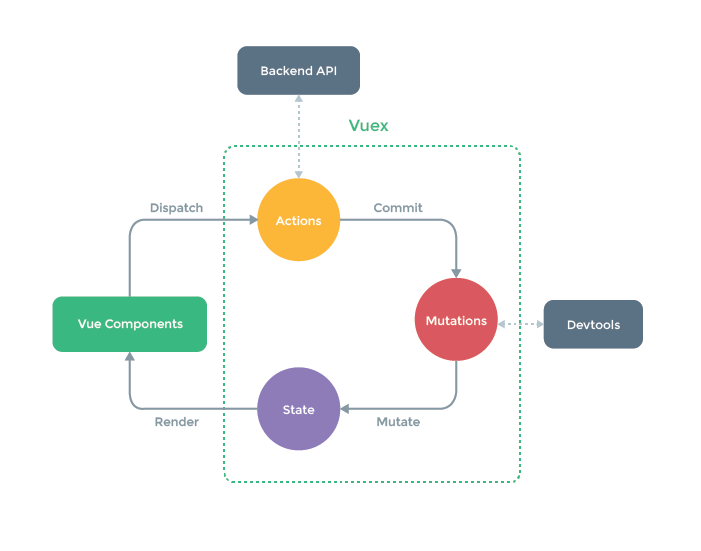
Vuex 是 state management pattern + library 工具,集中儲存所有 components,加上特定改變狀態的規則。

State Management Pattern

  • state: 目前 app 的狀態
  • view: 根據 state 產生的畫面
  • actions: 從 view 取得 user input,修改 state

如果有多個 components 共享 common state 會遇到的問題

  • multiple views 會由 the same piece of state 決定
  • 由不同的 views 產生的 actions,可改變 the same piece of state

Vuex 提出的方法是將 shared state 由 components 取出來,並用 global singleton 管理。

Vuex 可協助處理 shared state management,如果 app 很簡單,不是大型 SPA,就不需要 Vuex,只需要用 store pattern 即可

Store Pattern

如果有兩個 component 需要共享一個 state 時,可能會這樣寫

<div id="app-a">App A: {{ message }}</div>
<div id="app-b">App B: {{ message }}</div>

<script>
const { createApp, reactive } = Vue

const sourceOfTruth = reactive({
  message: 'Hello'
})

const appA = createApp({
  data() {
    return sourceOfTruth
  }
}).mount('#app-a')

const appB = createApp({
  data() {
    return sourceOfTruth
  },
  mounted() {
    sourceOfTruth.message = 'Goodbye' // both apps will render 'Goodbye' message now
  }
}).mount('#app-b')

</script>

畫面上兩個文字部分,都會變成 Goodbye

因為 sourceOfTruth 可以在程式中任意一個地方,被修改資料,當程式變多,會造成 debug 的難度。

這個問題就用 store pattern 處理。

store 類似 java 的 data object,透過 set method 修改資料內容,資料以 reactive 通知 Vue 處理異動。

<div id="app-a">{{sharedState.message}}</div>
<div id="app-b">{{sharedState.message}}</div>

<script>
const { createApp, reactive } = Vue

const store = {
  debug: true,

  state: reactive({
    message: 'Hello!'
  }),

  setMessageAction(newValue) {
    if (this.debug) {
      console.log('setMessageAction triggered with', newValue)
    }

    this.state.message = newValue
  },

  clearMessageAction() {
    if (this.debug) {
      console.log('clearMessageAction triggered')
    }

    this.state.message = ''
  }
}

const appA = createApp({
  data() {
    return {
      privateState: {},
      sharedState: store.state
    }
  },
  mounted() {
    store.setMessageAction('Goodbye!')
  }
}).mount('#app-a')

const appB = createApp({
  data() {
    return {
      privateState: {},
      sharedState: store.state
    }
  }
}).mount('#app-b')

Simplest Store

Vuex app 的核心就是 store,用來儲存 app 的狀態,以下兩點,是 Vuex store 跟 global object 的差異

  1. Vuex stores 是 reactive,如果 Vue component 使用了 state,將會在 state 異動時,自動更新 component
  2. 無法直接修改 store 的 state,修改的方式是透過 committing mutations,可確保 state change 可被追蹤

透過 mutations methods 異動 state

<div id="app-a">
  {{sharedState.count}}
   <button @click="increment">increment</button>
</div>

<script>
// import { createApp } from 'vue'
// import { createStore } from 'vuex'
const { createApp, reactive } = Vue
const { createStore } = Vuex

// Create a new store instance.
const store = createStore({
  state () {
    return {
      count: 0
    }
  },
  mutations: {
    increment (state) {
      state.count++
    }
  }
})

const app = createApp({
  data() {
    return {
      privateState: {},
      sharedState: store.state
    }
  },
  methods: {
    increment() {
      this.$store.commit('increment')
      console.log(this.$store.state.count)
    }
  }
})

app.mount('#app-a')
app.use(store)

</script>

State

Single State Tree

single state tree 就是包含 application 所有 state 的單一物件,也就是 "single sure of truth",每一個 application 都只有一個 store。單一物件容易使用部分 state 資料,也很容易 snapshot 目前的狀態值。

single state 並不會跟 modularity 概念衝突,後面會說明如何將 state 與 mutations 分割到 sub modules

store 儲存的 data 遵循 Vue instance 裡面的 data 的規則

Getting Vuex State into Vue Components

因為 Vuex store 是 reactive,最簡單的方法就是透過 computed property 取出部分 store state

以下產生一個 component,並將 store inject 到 component 中,透過 this.$store 存取

<div id="app">
  <counter></counter>
</div>

<script>
// import { createApp } from 'vue'
// import { createStore } from 'vuex'
const { createApp, reactive } = Vue
const { createStore } = Vuex

// Create a new store instance.
const store = createStore({
  state () {
    return {
      count: 0
    }
  },
  mutations: {
    increment (state) {
      state.count++
    }
  }
})


const app = createApp({
  data() {
    return {
      privateState: {},
      sharedState: store.state
    }
  },

})

const Counter = {
  template: `<div>{{ count }}</div> <button @click="increment">increment</button>`,
  computed: {
    count () {
      return this.$store.state.count
    }
  },
  methods: {
    increment() {
      this.$store.commit('increment')
      console.log(this.$store.state.count)
    }
  }
}

app.use(store)
app.component('counter', Counter)

app.mount('#app')

</script>

mapState

當 component 需要使用多個 store state properties or getters,宣告多個 computed property 會很麻煩,Vuex 用 mapState 產生 computed getter functions

<div id="app">
  <counter></counter>
</div>

<script>
// import { createApp } from 'vue'
// import { createStore } from 'vuex'
const { createApp, reactive } = Vue
const { createStore, mapState } = Vuex

// Create a new store instance.
const store = createStore({
  state () {
    return {
      count: 0
    }
  },
  mutations: {
    increment (state) {
      state.count++
    }
  }
})


const app = createApp({
  data() {
    return {
      privateState: {},
      sharedState: store.state
    }
  },

})

const Counter = {
  template: `<div>{{ count }}</div>
    <div>{{ countAlias }}</div>
    <div>{{ countPlusLocalState }}</div>
    <button @click="increment">increment</button>`,
  data() {
    return {
      localCount: 2,
    };
  },
  computed: mapState({
    // arrow functions can make the code very succinct!
    count: state => state.count,

    // passing the string value 'count' is same as `state => state.count`
    countAlias: 'count',

    // to access local state with `this`, a normal function must be used
    countPlusLocalState (state) {
      return state.count + this.localCount
    }
  }),
  methods: {
    increment() {
      this.$store.commit('increment')
      console.log(this.$store.state.count)
    }
  }
}

app.use(store)
app.component('counter', Counter)

app.mount('#app')

</script>

也可以直接傳入 string array 給 mapState,mapped computed property 的名稱要跟原本 state sub tree name 一樣

  computed: mapState([
      'count'
    ]),

Object Spread Operator

mapState 會回傳一個物件,如果要組合使用 local computed property,通常要用 utility 將多個物件 merge 在一起,再將該整合物件傳給 computed

利用 object spread operator 可簡化語法

<div id="app">
  <counter></counter>
</div>

<script>
// import { createApp } from 'vue'
// import { createStore } from 'vuex'
const { createApp, reactive } = Vue
const { createStore, mapState, mapGetters } = Vuex

// Create a new store instance.
const store = createStore({
  state () {
    return {
      count: 0,
      todos: [{
          id: 1,
          text: '...',
          done: true
        },
        {
          id: 2,
          text: '...',
          done: false
        }
      ]
    }
  },
  getters: {
    doneTodos: state => {
      return state.todos.filter(todo => todo.done)
    },
    doneTodosCount: (state,getters) => {
      return getters.doneTodos.length
    },
    getTodoById: (state) => (id) => {
      return state.todos.find(todo => todo.id === id)
    }
  },
  mutations: {
    increment (state) {
      state.count++
    }
  }
})


const app = createApp({
  data() {
    return {
      privateState: {},
      sharedState: store.state
    }
  },

})

const Counter = {
  template: `<div>
    <div>{{count}}</div>
    <div>{{countAlias}}</div>
    <div>{{countPlusLocalState}}</div>

    <div>{{doneTodos}}</div>
    <div>{{doneTodosAlias}}</div>
    <div>{{doneTodosCount}}</div>
    <div>{{getTodoById}}</div>
  </div>
    <button @click="increment">increment</button>`,
  data() {
    return {
      localCount: 2,
    };
  },
  computed: {

    // 本地 computed
    getTodoById() {
      return this.$store.getters.getTodoById(2);
    },

    // 使用展開運算符將 mapState 混合到外部物件中
    ...mapState([
      'count',
    ]),
    ...mapState({
      countAlias: 'count',
      countPlusLocalState(state) {
        return state.count + this.localCount;
      },
    }),

    // 使用展開運算符將 mapGetters 混合到外部物件中
    ...mapGetters([
      'doneTodos',
      'doneTodosCount',
    ]),
    ...mapGetters({
      doneTodosAlias: 'doneTodos',
    }),
  },
  methods: {
    increment() {
      this.$store.commit('increment')
      console.log(this.$store.state.count)
    }
  }
}

app.use(store)
app.component('counter', Counter)

app.mount('#app')

</script>

Getters

有時候需要根據儲存的 state 計算出衍生的 state

ex:

computed: {
  doneTodosCount () {
    return this.$store.state.todos.filter(todo => todo.done).length
  }
}

如果有多個 component 需要這個 function,可以在 store 裡面定義 getters,第一個參數固定為 state

const store = createStore({
  state: {
    todos: [
      { id: 1, text: '...', done: true },
      { id: 2, text: '...', done: false }
    ]
  },
  getters: {
    doneTodos (state) {
      return state.todos.filter(todo => todo.done)
    }
  }
})

Property-Style Access

getters 是透過 store.getters 物件使用

store.getters.doneTodos // -> [{ id: 1, text: '...', done: true }]

可接受其他 getters 為第二個參數

getters: {
  // ...
  doneTodosCount (state, getters) {
    return getters.doneTodos.length
  }
}
store.getters.doneTodosCount // -> 1

在 component 可這樣呼叫

computed: {
  doneTodosCount () {
    return this.$store.getters.doneTodosCount
  }
}

Method-Style Access

可利用 return a function 傳給 getters 參數,這對於查詢 store 裡面的 array 很有用

getters: {
  // ...
  getTodoById: (state) => (id) => {
    return state.todos.find(todo => todo.id === id)
  }
}
store.getters.getTodoById(2) // -> { id: 2, text: '...', done: false }

mapGetters

map store getters 為 local computed properties

import { mapGetters } from 'vuex'

export default {
  // ...
  computed: {
    // mix the getters into computed with object spread operator
    ...mapGetters([
      'doneTodosCount',
      'anotherGetter',
      // ...
    ])
  }
}

可 mapping 為不同名稱

...mapGetters({
  // map `this.doneCount` to `this.$store.getters.doneTodosCount`
  doneCount: 'doneTodosCount'
})

Mutations

修改 state 的方式是透過 committing a mutation

Vuex mutations 類似 events,每個 mutation 都有 string type 及 a handler

const store = createStore({
  state: {
    count: 1
  },
  mutations: {
    increment (state) {
      // mutate state
      state.count++
    }
  }
})

不能直接呼叫 mutation handler,必須這樣呼叫

store.commit('increment')

Commit with Payload

傳送新增的參數給 store.commit 稱為 mutation 的 payload

// ...
mutations: {
  increment (state, n) {
    state.count += n
  }
}

呼叫

store.commit('increment', 10)

通常 payload 會是一個 object,裡面有多個欄位

// ...
mutations: {
  increment (state, payload) {
    state.count += payload.amount
  }
}

呼叫

store.commit('increment', {
  amount: 10
})

Object-Style Commit

commit a mutation 的另一個方式

store.commit({
  type: 'increment',
  amount: 10
})

這時候,整個物件會成為 payload,故 handler 不變

mutations: {
  increment (state, payload) {
    state.count += payload.amount
  }
}

Using Constants for Mutation Types

常見到在 Flux 會使用 constants 為 mutation types,優點是可將所有 constants 集中放在一個檔案裡面,可快速知道整個 applicaiton 的 mutations

// mutation-types.js
export const SOME_MUTATION = 'SOME_MUTATION'
// store.js
import { createStore } from 'vuex'
import { SOME_MUTATION } from './mutation-types'

const store = createStore({
  state: { ... },
  mutations: {
    // we can use the ES2015 computed property name feature
    // to use a constant as the function name
    [SOME_MUTATION] (state) {
      // mutate state
    }
  }
})

Mutations Must Be Synchronous

mutation handler functions must be synchronous

如果這樣寫,當 commit mutation 時 callback 無法被呼叫。devtool 無法得知什麼時候被呼叫了 callback

mutations: {
  someMutation (state) {
    api.callAsyncMethod(() => {
      state.count++
    })
  }
}

Committing Mutations in Components

可用 this.$store.commit('xxx') 或是 mapMutations helper

import { mapMutations } from 'vuex'

export default {
  // ...
  methods: {
    ...mapMutations([
      'increment', // map `this.increment()` to `this.$store.commit('increment')`

      // `mapMutations` also supports payloads:
      'incrementBy' // map `this.incrementBy(amount)` to `this.$store.commit('incrementBy', amount)`
    ]),
    ...mapMutations({
      add: 'increment' // map `this.add()` to `this.$store.commit('increment')`
    })
  }
}

Vuex 的 mutations 是 synchronous transactions

store.commit('increment')
// any state change that the "increment" mutation may cause
// should be done at this moment.

如果需要用到 asynchronous opertions,要使用 Actions


Actions

類似 mutations,差別:

  • actions commit mutations,而不是 mutating the state
  • actions 可封裝任意非同步 operations

這是簡單的 actions 例子

const store = createStore({
  state: {
    count: 0
  },
  mutations: {
    increment (state) {
      state.count++
    }
  },
  actions: {
    increment (context) {
      context.commit('increment')
    }
  }
})

action handler 以 context 為參數,裡面是 store instance 的 methods/properties,故能呼叫 context.commit commit a mutation,context.statecontext.getters

也能用 context.dispatch 呼叫其他 actions

只使用 commit 的時候,可這樣簡化寫法

actions: {
  increment ({ commit }) {
    commit('increment')
  }
}

Dispatching Actions

store.dispatch 會驅動 actions

store.dispatch('increment')

因為 mutations 必須要為 synchronous,故如要處理 asynchronous operations,而不是直接呼叫 store.commit('increment')

actions: {
  incrementAsync ({ commit }) {
    setTimeout(() => {
      commit('increment')
    }, 1000)
  }
}

actions 支援 payload format & object-style dispatch

// dispatch with a payload
store.dispatch('incrementAsync', {
  amount: 10
})

// dispatch with an object
store.dispatch({
  type: 'incrementAsync',
  amount: 10
})

這是更真實的例子:checkout a shopping cart

actions: {
  checkout ({ commit, state }, products) {
    // save the items currently in the cart
    const savedCartItems = [...state.cart.added]
    // send out checkout request, and optimistically
    // clear the cart
    commit(types.CHECKOUT_REQUEST)
    // the shop API accepts a success callback and a failure callback
    shop.buyProducts(
      products,
      // handle success
      () => commit(types.CHECKOUT_SUCCESS),
      // handle failure
      () => commit(types.CHECKOUT_FAILURE, savedCartItems)
    )
  }
}

Dispatching Actions in Components

可使用 this.$store.dispatch('xxx')mapActions helper 在 component 中 dispatch actions

import { mapActions } from 'vuex'

export default {
  // ...
  methods: {
    ...mapActions([
      'increment', // map `this.increment()` to `this.$store.dispatch('increment')`

      // `mapActions` also supports payloads:
      'incrementBy' // map `this.incrementBy(amount)` to `this.$store.dispatch('incrementBy', amount)`
    ]),
    ...mapActions({
      add: 'increment' // map `this.add()` to `this.$store.dispatch('increment')`
    })
  }
}

Composing Actions

因 action 是非同步的,可利用 Promise 得知 action 已完成

actions: {
  actionA ({ commit }) {
    return new Promise((resolve, reject) => {
      setTimeout(() => {
        commit('someMutation')
        resolve()
      }, 1000)
    })
  }
}

現在就能這樣呼叫

store.dispatch('actionA').then(() => {
  // ...
})

////// 在另一個 action 可這樣呼叫
actions: {
  // ...
  actionB ({ dispatch, commit }) {
    return dispatch('actionA').then(() => {
      commit('someOtherMutation')
    })
  }
}

可利用 async/await 撰寫 actions

// assuming `getData()` and `getOtherData()` return Promises

actions: {
  async actionA ({ commit }) {
    commit('gotData', await getData())
  },
  async actionB ({ dispatch, commit }) {
    await dispatch('actionA') // wait for `actionA` to finish
    commit('gotOtherData', await getOtherData())
  }
}

Modules

因使用 single state tree,application 的所有 states 集中在一個物件中,如果 application 很大,store 也會很大

Vuex 可將 store 切割為 modules,每個 module 有各自的 state, mutations, actions, getters, nested modules

const moduleA = {
  state: () => ({ ... }),
  mutations: { ... },
  actions: { ... },
  getters: { ... }
}

const moduleB = {
  state: () => ({ ... }),
  mutations: { ... },
  actions: { ... }
}

const store = createStore({
  modules: {
    a: moduleA,
    b: moduleB
  }
})

store.state.a // -> `moduleA`'s state
store.state.b // -> `moduleB`'s state

Module Local State

在 module 的 mutations 與 getters,第一個參數為 module 的 local state

const moduleA = {
  state: () => ({
    count: 0
  }),
  mutations: {
    increment (state) {
      // `state` is the local module state
      state.count++
    }
  },
  getters: {
    doubleCount (state) {
      return state.count * 2
    }
  }
}

在 module action,透過 context.state存取 local state,透過 context.rootState 存取 root state

const moduleA = {
  // ...
  actions: {
    incrementIfOddOnRootSum ({ state, commit, rootState }) {
      if ((state.count + rootState.count) % 2 === 1) {
        commit('increment')
      }
    }
  }
}

在 module getter,rootState 是第三個參數

const moduleA = {
  // ...
  getters: {
    sumWithRootCount (state, getters, rootState) {
      return state.count + rootState.count
    }
  }
}

Namespacing

actions, mutations, getters 預設註冊為 global namespace

可用 namespaces:true ,自動加上 module name

const store = createStore({
  modules: {
    account: {
      namespaced: true,

      // module assets
      state: () => ({ ... }), // module state is already nested and not affected by namespace option
      getters: {
        isAdmin () { ... } // -> getters['account/isAdmin']
      },
      actions: {
        login () { ... } // -> dispatch('account/login')
      },
      mutations: {
        login () { ... } // -> commit('account/login')
      },

      // nested modules
      modules: {
        // inherits the namespace from parent module
        myPage: {
          state: () => ({ ... }),
          getters: {
            profile () { ... } // -> getters['account/profile']
          }
        },

        // further nest the namespace
        posts: {
          namespaced: true,

          state: () => ({ ... }),
          getters: {
            popular () { ... } // -> getters['account/posts/popular']
          }
        }
      }
    }
  }
})
  • Accessing Global Assets in Namespaced Modules

rootStaterootGetters 有傳入 getter function 作為第三、四個參數,且可透過 context 物件使用 properties

如果要使用 global namespace 的 actions, mutations,要在 dispatch, commit 傳入 {root:true}

modules: {
  foo: {
    namespaced: true,

    getters: {
      // `getters` is localized to this module's getters
      // you can use rootGetters via 4th argument of getters
      someGetter (state, getters, rootState, rootGetters) {
        getters.someOtherGetter // -> 'foo/someOtherGetter'
        rootGetters.someOtherGetter // -> 'someOtherGetter'
        rootGetters['bar/someOtherGetter'] // -> 'bar/someOtherGetter'
      },
      someOtherGetter: state => { ... }
    },

    actions: {
      // dispatch and commit are also localized for this module
      // they will accept `root` option for the root dispatch/commit
      someAction ({ dispatch, commit, getters, rootGetters }) {
        getters.someGetter // -> 'foo/someGetter'
        rootGetters.someGetter // -> 'someGetter'
        rootGetters['bar/someGetter'] // -> 'bar/someGetter'

        dispatch('someOtherAction') // -> 'foo/someOtherAction'
        dispatch('someOtherAction', null, { root: true }) // -> 'someOtherAction'

        commit('someMutation') // -> 'foo/someMutation'
        commit('someMutation', null, { root: true }) // -> 'someMutation'
      },
      someOtherAction (ctx, payload) { ... }
    }
  }
}
  • register global actions in namespaces modules
{
  actions: {
    someOtherAction ({dispatch}) {
      dispatch('someAction')
    }
  },
  modules: {
    foo: {
      namespaced: true,

      actions: {
        someAction: {
          root: true,
          handler (namespacedContext, payload) { ... } // -> 'someAction'
        }
      }
    }
  }
}
  • binding helpers with namespace

如果要呼叫 nested module 的 getters, action 會比較麻煩

computed: {
  ...mapState({
    a: state => state.some.nested.module.a,
    b: state => state.some.nested.module.b
  }),
  ...mapGetters([
    'some/nested/module/someGetter', // -> this['some/nested/module/someGetter']
    'some/nested/module/someOtherGetter', // -> this['some/nested/module/someOtherGetter']
  ])
},
methods: {
  ...mapActions([
    'some/nested/module/foo', // -> this['some/nested/module/foo']()
    'some/nested/module/bar' // -> this['some/nested/module/bar']()
  ])
}

可用 module namespace string 作為第一個參數鎚入 helpers

computed: {
  ...mapState('some/nested/module', {
    a: state => state.a,
    b: state => state.b
  }),
  ...mapGetters('some/nested/module', [
    'someGetter', // -> this.someGetter
    'someOtherGetter', // -> this.someOtherGetter
  ])
},
methods: {
  ...mapActions('some/nested/module', [
    'foo', // -> this.foo()
    'bar' // -> this.bar()
  ])
}

也可以用 createNamespacedHelpers

import { createNamespacedHelpers } from 'vuex'

const { mapState, mapActions } = createNamespacedHelpers('some/nested/module')

export default {
  computed: {
    // look up in `some/nested/module`
    ...mapState({
      a: state => state.a,
      b: state => state.b
    })
  },
  methods: {
    // look up in `some/nested/module`
    ...mapActions([
      'foo',
      'bar'
    ])
  }
}
  • caveat for plugin developers

如果有 plugin 提供 module,並讓使用者加入 vuex store,如果 plugin user 把 module 加入某個 namespaced module,會讓使用者的 module 也被 namespaced

可透過 plugin option 的 namedspace 參數解決此問題

// get namespace value via plugin option
// and returns Vuex plugin function
export function createPlugin (options = {}) {
  return function (store) {
    // add namespace to plugin module's types
    const namespace = options.namespace || ''
    store.dispatch(namespace + 'pluginAction')
  }
}

Dynamic Module Registration

可在 store 產生後,再透過 store.registerModule 註冊 module

import { createStore } from 'vuex'

const store = createStore({ /* options */ })

// register a module `myModule`
store.registerModule('myModule', {
  // ...
})

// register a nested module `nested/myModule`
store.registerModule(['nested', 'myModule'], {
  // ...
})

module 的 state 為 store.state.myModule and store.state.nested.myModule

動態註冊的 module,可用 store.unregisterModule(moduleName) 移除

可用 store.hasModule(moduleName) 檢查是否有被註冊

  • Preserving state

註冊新的 module 時,可用 preserveState option: store.registerModule('a', module, { preserveState: true }) 保留 state

Module Reuse

有時候需要產生 module 的多個 instance,ex:

  • 用一個 module 產生多個 store
  • 在一個 store 重複註冊某個 module

如果用 plain object 宣告 state of the module,state object 會以 reference 方式被分享,如果 mutated 時,會造成 cross store/module state pollution

解決方法:use a function for declaring module state

const MyReusableModule = {
  state: () => ({
    foo: 'bar'
  }),
  // mutations, actions, getters...
}

References

Vuex

2022/4/11

Vue AJAX with axios

Vue AJAX with axios

axios 是支援 Promise 的 HTTP client library,Vue 可透過 axios 向 server 取得資料。使用時,可搭配 ES6 語法,用 async/await 及 Promise,可以取消 request,自動轉換 JSON。

get, post

<!DOCTYPE html>
<html lang="en">
<head>
  <!-- <script src="https://unpkg.com/vue@3.2.10"></script> -->
  <!-- <script src="https://unpkg.com/vue@3.2.10/dist/vue.global.js"></script> -->
  <script src="https://unpkg.com/vue@3.2.10/dist/vue.global.prod.js"></script>

  <script src="https://unpkg.com/axios/dist/axios.min.js"></script>

</head>

<body>

<div id="app">
  {{ info }}
</div>

<script type = "text/javascript">
const vm = Vue.createApp({
  data () {
    return {
      info: null
    }
  },
  mounted () {
    axios
      .get('1-1-axios.json')
      .then(response => (this.info = response))
      .catch(function (error) {
        console.log(error);
      });
  }
}).mount('#app')
</script>
</body>

</html>

執行頁面

{ "data": { "name": "網站", "num": 3, "sites": [ { "name": "Google", "info": [ "Android", "Google 搜索", "Google 翻譯" ] }, { "name": "Yahoo", "info": [ "Yahoo", "Yahoo", "Yahoo" ] }, { "name": "Facebook", "info": [ "Facebook", "Facebook" ] } ] }, "status": 200, "statusText": "OK", "headers": { "accept-ranges": "bytes", "connection": "Keep-Alive", "content-length": "274", "content-type": "application/json", "date": "Tue, 14 Sep 2021 09:06:24 GMT", "etag": "\"112-5cbf0e53aa9b4\"", "keep-alive": "timeout=5, max=99", "last-modified": "Tue, 14 Sep 2021 09:06:21 GMT", "server": "Apache/2.4.6 (CentOS) OpenSSL/1.0.1e-fips mod_fcgid/2.3.9 PHP/5.4.16 mod_wsgi/3.4 Python/2.7.5" }, "config": { "url": "1-1-axios.json", "method": "get", "headers": { "Accept": "application/json, text/plain, */*" }, "transformRequest": [ null ], "transformResponse": [ null ], "timeout": 0, "xsrfCookieName": "XSRF-TOKEN", "xsrfHeaderName": "X-XSRF-TOKEN", "maxContentLength": -1, "maxBodyLength": -1, "transitional": { "silentJSONParsing": true, "forcedJSONParsing": true, "clarifyTimeoutError": false } }, "request": "[object XMLHttpRequest]" }

透過 JSON 搭配 v-for

<div id="app">
  <div
    v-for="site in info"
  >
    {{ site.name }}
  </div>
</div>

<script type = "text/javascript">
const vm = Vue.createApp({
  data () {
    return {
      info: null
    }
  },
  mounted () {
    axios
      .get('1-1-axios.json')
      .then(response => (this.info = response.data.sites))
      .catch(function (error) {
        console.log(error);
      });
  }
}).mount('#app')
</script>

剛剛看到的是使用 get method,也可以用 post method 傳入參數

axios.post('/user', {
    firstName: 'Fred', 
    lastName: 'Flintstone'
  })
  .then(function (response) {
    console.log(response);
  })
  .catch(function (error) {
    console.log(error);
  });

axios.all

如果有兩個 request,並希望兩個都要完成

function getUserAccount() {
  return axios.get('/user/12345');
}

function getUserPermissions() {
  return axios.get('/user/12345/permissions');
}
axios.all([getUserAccount(), getUserPermissions()])
  .then(axios.spread(function (acct, perms) {
    // 兩個 request 都執行完成
  }));

config

可用 config 物件,傳送給 axios 的寫法

axios(config)

// Send a POST request
axios({
  method: 'post',
  url: '/user/12345',
  data: {
    firstName: 'Fred',
    lastName: 'Flintstone'
  }
});

// GET request for remote image in node.js
axios({
  method: 'get',
  url: 'http://bit.ly/2mTM3nY',
  responseType: 'stream'
})
  .then(function (response) {
    response.data.pipe(fs.createWriteStream('ada_lovelace.jpg'))
  });

axios(url[, config])

// Send a GET request (default method)
axios('/user/12345');

Request method alias

使用 alias 語法時,config 不需要指定 url, method, and data properties

axios.request(config)
axios.get(url[, config])
axios.delete(url[, config])
axios.head(url[, config])
axios.options(url[, config])
axios.post(url[, data[, config]])
axios.put(url[, data[, config]])
axios.patch(url[, data[, config]])

instance

可用 custom config 產生 instance of axios

axios.create([config])

const instance = axios.create({
  baseURL: 'https://some-domain.com/api/',
  timeout: 1000,
  headers: {'X-Custom-Header': 'foobar'}
});

instance methods

axios#request(config)
axios#get(url[, config])
axios#delete(url[, config])
axios#head(url[, config])
axios#options(url[, config])
axios#post(url[, data[, config]])
axios#put(url[, data[, config]])
axios#patch(url[, data[, config]])
axios#getUri([config])

config

以下為 config options,裡面只有 url 為必要欄位

{
  // `url` is the server URL that will be used for the request
  url: '/user',

  // `method` is the request method to be used when making the request
  method: 'get', // default

  // baseURL 會加到 url 前面
  baseURL: 'https://some-domain.com/api/',

  // 可在傳給 server 前,修改 request data 及 headers 物件
  // 只能用在 PUT, POST, PATCH, DELETE
  // 在 array 的最後一個 function必須回傳 string 或 Buffer, ArrayBuffer, FormData, Stream
  transformRequest: [function (data, headers) {
    // Do whatever you want to transform the data

    return data;
  }],

  // 可在傳送給 then, catch 以前,修改 response data
  transformResponse: [function (data) {
    // Do whatever you want to transform the data

    return data;
  }],

  // `headers` are custom headers to be sent
  // 自訂 headers
  headers: {'X-Requested-With': 'XMLHttpRequest'},

  // URL parameter,一定要是 plain object 或 URLSearchParams object
  params: {
    ID: 12345
  },

  // `paramsSerializer` is an optional function in charge of serializing `params`
  // (e.g. https://www.npmjs.com/package/qs, http://api.jquery.com/jquery.param/)
  paramsSerializer: function (params) {
    return Qs.stringify(params, {arrayFormat: 'brackets'})
  },

  // `data` is the data to be sent as the request body
  // Only applicable for request methods 'PUT', 'POST', 'DELETE , and 'PATCH'
  // When no `transformRequest` is set, must be of one of the following types:
  // - string, plain object, ArrayBuffer, ArrayBufferView, URLSearchParams
  // - Browser only: FormData, File, Blob
  // - Node only: Stream, Buffer
  data: {
    firstName: 'Fred'
  },

  // syntax alternative to send data into the body
  // method post
  // only the value is sent, not the key
  data: 'Country=Brasil&City=Belo Horizonte',

  // `timeout` specifies the number of milliseconds before the request times out.
  // If the request takes longer than `timeout`, the request will be aborted.
  timeout: 1000, // default is `0` (no timeout)

  // `withCredentials` indicates whether or not cross-site Access-Control requests
  // should be made using credentials
  withCredentials: false, // default

  // `adapter` allows custom handling of requests which makes testing easier.
  // Return a promise and supply a valid response (see lib/adapters/README.md).
  adapter: function (config) {
    /* ... */
  },

  // `auth` indicates that HTTP Basic auth should be used, and supplies credentials.
  // This will set an `Authorization` header, overwriting any existing
  // `Authorization` custom headers you have set using `headers`.
  // Please note that only HTTP Basic auth is configurable through this parameter.
  // For Bearer tokens and such, use `Authorization` custom headers instead.
  auth: {
    username: 'janedoe',
    password: 's00pers3cret'
  },

  // `responseType` indicates the type of data that the server will respond with
  // options are: 'arraybuffer', 'document', 'json', 'text', 'stream'
  //   browser only: 'blob'
  responseType: 'json', // default

  // `responseEncoding` indicates encoding to use for decoding responses (Node.js only)
  // Note: Ignored for `responseType` of 'stream' or client-side requests
  responseEncoding: 'utf8', // default

  // `xsrfCookieName` is the name of the cookie to use as a value for xsrf token
  xsrfCookieName: 'XSRF-TOKEN', // default

  // `xsrfHeaderName` is the name of the http header that carries the xsrf token value
  xsrfHeaderName: 'X-XSRF-TOKEN', // default

  // `onUploadProgress` allows handling of progress events for uploads
  // browser only
  onUploadProgress: function (progressEvent) {
    // Do whatever you want with the native progress event
  },

  // `onDownloadProgress` allows handling of progress events for downloads
  // browser only
  onDownloadProgress: function (progressEvent) {
    // Do whatever you want with the native progress event
  },

  // `maxContentLength` defines the max size of the http response content in bytes allowed in node.js
  maxContentLength: 2000,

  // `maxBodyLength` (Node only option) defines the max size of the http request content in bytes allowed
  maxBodyLength: 2000,

  // `validateStatus` defines whether to resolve or reject the promise for a given
  // HTTP response status code. If `validateStatus` returns `true` (or is set to `null`
  // or `undefined`), the promise will be resolved; otherwise, the promise will be
  // rejected.
  validateStatus: function (status) {
    return status >= 200 && status < 300; // default
  },

  // `maxRedirects` defines the maximum number of redirects to follow in node.js.
  // If set to 0, no redirects will be followed.
  maxRedirects: 5, // default

  // `socketPath` defines a UNIX Socket to be used in node.js.
  // e.g. '/var/run/docker.sock' to send requests to the docker daemon.
  // Only either `socketPath` or `proxy` can be specified.
  // If both are specified, `socketPath` is used.
  socketPath: null, // default

  // `httpAgent` and `httpsAgent` define a custom agent to be used when performing http
  // and https requests, respectively, in node.js. This allows options to be added like
  // `keepAlive` that are not enabled by default.
  httpAgent: new http.Agent({ keepAlive: true }),
  httpsAgent: new https.Agent({ keepAlive: true }),

  // `proxy` defines the hostname, port, and protocol of the proxy server.
  // You can also define your proxy using the conventional `http_proxy` and
  // `https_proxy` environment variables. If you are using environment variables
  // for your proxy configuration, you can also define a `no_proxy` environment
  // variable as a comma-separated list of domains that should not be proxied.
  // Use `false` to disable proxies, ignoring environment variables.
  // `auth` indicates that HTTP Basic auth should be used to connect to the proxy, and
  // supplies credentials.
  // This will set an `Proxy-Authorization` header, overwriting any existing
  // `Proxy-Authorization` custom headers you have set using `headers`.
  // If the proxy server uses HTTPS, then you must set the protocol to `https`. 
  proxy: {
    protocol: 'https',
    host: '127.0.0.1',
    port: 9000,
    auth: {
      username: 'mikeymike',
      password: 'rapunz3l'
    }
  },

  // `cancelToken` specifies a cancel token that can be used to cancel the request
  // (see Cancellation section below for details)
  cancelToken: new CancelToken(function (cancel) {
  }),

  // `decompress` indicates whether or not the response body should be decompressed 
  // automatically. If set to `true` will also remove the 'content-encoding' header 
  // from the responses objects of all decompressed responses
  // - Node only (XHR cannot turn off decompression)
  decompress: true // default

  // `insecureHTTPParser` boolean.
  // Indicates where to use an insecure HTTP parser that accepts invalid HTTP headers.
  // This may allow interoperability with non-conformant HTTP implementations.
  // Using the insecure parser should be avoided.
  // see options https://nodejs.org/dist/latest-v12.x/docs/api/http.html#http_http_request_url_options_callback
  // see also https://nodejs.org/en/blog/vulnerability/february-2020-security-releases/#strict-http-header-parsing-none
  insecureHTTPParser: undefined // default

  // transitional options for backward compatibility that may be removed in the newer versions
  transitional: {
    // silent JSON parsing mode
    // `true`  - ignore JSON parsing errors and set response.data to null if parsing failed (old behaviour)
    // `false` - throw SyntaxError if JSON parsing failed (Note: responseType must be set to 'json')
    silentJSONParsing: true, // default value for the current Axios version

    // try to parse the response string as JSON even if `responseType` is not 'json'
    forcedJSONParsing: true,

    // throw ETIMEDOUT error instead of generic ECONNABORTED on request timeouts
    clarifyTimeoutError: false,
  }
}

response schema

{
  // `data` is the response that was provided by the server
  data: {},

  // `status` is the HTTP status code from the server response
  status: 200,

  // `statusText` is the HTTP status message from the server response
  statusText: 'OK',

  // `headers` the HTTP headers that the server responded with
  // All header names are lower cased and can be accessed using the bracket notation.
  // Example: `response.headers['content-type']`
  headers: {},

  // `config` is the config that was provided to `axios` for the request
  config: {},

  // `request` is the request that generated this response
  // It is the last ClientRequest instance in node.js (in redirects)
  // and an XMLHttpRequest instance in the browser
  request: {}
}

可用 then 取得

axios.get('/user/12345')
  .then(function (response) {
    console.log(response.data);
    console.log(response.status);
    console.log(response.statusText);
    console.log(response.headers);
    console.log(response.config);
  });

config default

// global axios defaults

axios.defaults.baseURL = 'https://api.example.com';

// Important: If axios is used with multiple domains, the AUTH_TOKEN will be sent to all of them.
// See below for an example using Custom instance defaults instead.
axios.defaults.headers.common['Authorization'] = AUTH_TOKEN;

axios.defaults.headers.post['Content-Type'] = 'application/x-www-form-urlencoded';


//////////////////////////////
// custom instance defaults
// Set config defaults when creating the instance
const instance = axios.create({
  baseURL: 'https://api.example.com'
});

// Alter defaults after instance has been created
instance.defaults.headers.common['Authorization'] = AUTH_TOKEN;

優先順序

// Create an instance using the config defaults provided by the library
// At this point the timeout config value is `0` as is the default for the library
const instance = axios.create();

// Override timeout default for the library
// Now all requests using this instance will wait 2.5 seconds before timing out
instance.defaults.timeout = 2500;

// Override timeout for this request as it's known to take a long time
instance.get('/longRequest', {
  timeout: 5000
});

Interceptors

在 then, catch 以前,攔截處理

// Add a request interceptor
axios.interceptors.request.use(function (config) {
    // Do something before request is sent
    return config;
  }, function (error) {
    // Do something with request error
    return Promise.reject(error);
  });

// Add a response interceptor
axios.interceptors.response.use(function (response) {
    // Any status code that lie within the range of 2xx cause this function to trigger
    // Do something with response data
    return response;
  }, function (error) {
    // Any status codes that falls outside the range of 2xx cause this function to trigger
    // Do something with response error
    return Promise.reject(error);
  });

// 移除 interceptor
const myInterceptor = axios.interceptors.request.use(function () {/*...*/});
axios.interceptors.request.eject(myInterceptor);

// add interceptor
const instance = axios.create();
instance.interceptors.request.use(function () {/*...*/});

錯誤處理

axios.get('/user/12345')
  .catch(function (error) {
    if (error.response) {
      // The request was made and the server responded with a status code
      // that falls out of the range of 2xx
      console.log(error.response.data);
      console.log(error.response.status);
      console.log(error.response.headers);
    } else if (error.request) {
      // The request was made but no response was received
      // `error.request` is an instance of XMLHttpRequest in the browser and an instance of
      // http.ClientRequest in node.js
      console.log(error.request);
    } else {
      // Something happened in setting up the request that triggered an Error
      console.log('Error', error.message);
    }
    console.log(error.config);
  });

取消

用 Cancel Token 取消 request

const CancelToken = axios.CancelToken;
const source = CancelToken.source();

axios.get('/user/12345', {
  cancelToken: source.token
}).catch(function (thrown) {
  if (axios.isCancel(thrown)) {
    console.log('Request canceled', thrown.message);
  } else {
    // handle error
  }
});

axios.post('/user/12345', {
  name: 'new name'
}, {
  cancelToken: source.token
})

// cancel the request (the message parameter is optional)
source.cancel('Operation canceled by the user.');

透過 CancelToken 建立時傳入的 executor

const CancelToken = axios.CancelToken;
let cancel;

axios.get('/user/12345', {
  cancelToken: new CancelToken(function executor(c) {
    // An executor function receives a cancel function as a parameter
    cancel = c;
  })
});

// cancel the request
cancel();

References

axios

Vue 3 使用 axios 套件取得遠端資料

Vue.js Ajax(axios)

Retiring vue-resource

2022/3/28

Vue Router

以下為 Vue Router 的一個例子,Vue Router 的用途,是能夠在單一網頁頁面中,在 browser 不重新載入到新的 url 的狀況下,能夠增加 url history 並調整頁面內容狀態的功能,也就是能夠實現 SPA (single page application) 的功能。

傳統的網頁,會向 web application server 要求打開一個 url 網址,server 會回傳整個網頁的 html 內容。後來為了在不轉向到新的 url 的條件下,並調整網頁的內容,就發生了 web service,server 會從某個網址回傳 XML 或 JSON,網頁透過 AJAX 方式提取資料更新網頁內容。SPA 是更進一步,可在不重新發出新的 url request 到 server 的條件下,更新網頁內容並增加 url 瀏覽歷程,也就是增加了單一網頁頁面的顯示狀態。

Vue router 實例:

<!DOCTYPE html>
<html lang="en">
<head>
  <!-- <script src="https://unpkg.com/vue@3.2.10"></script> -->
  <!-- <script src="https://unpkg.com/vue@3.2.10/dist/vue.global.js"></script> -->
  <script src="https://unpkg.com/vue@3.2.10/dist/vue.global.prod.js"></script>
  <!-- <script src="https://unpkg.com/vue-router@4.0.11"></script> -->
  <!-- <script src="https://unpkg.com/vue-router@4.0.11/dist/vue.global.js"></script> -->
  <script src="https://unpkg.com/vue-router@4.0.11/dist/vue-router.global.prod.js"></script>
<!--
  <script src="https://unpkg.com/vue/dist/vue.js"></script>
  <script src="https://unpkg.com/vue-router/dist/vue-router.js"></script> -->

</head>

<body>

<div id="app">
  <h1>Hello App!</h1>
  <p>
    <!-- use the router-link component for navigation. -->
    <!-- specify the link by passing the `to` prop. -->
    <!-- `<router-link>` will render an `<a>` tag with the correct `href` attribute -->
    <router-link to="/">Go to Home</router-link>
    <router-link to="/foo">Go to Foo</router-link>
    <router-link to="/bar">Go to Bar</router-link>
  </p>
  <!-- route outlet -->
  <!-- component matched by the route will render here -->
  <router-view></router-view>
</div>

<script>
// 1. Define route components.
// These can be imported from other files
const Home = { template: '<div>Home</div>' }
const Foo = { template: '<div>foo</div>' }
const Bar = { template: '<div>bar</div>' }

// 2. Define some routes
// Each route should map to a component.
// We'll talk about nested routes later.
const routes = [
  { path: '/', component: Home },
  { path: '/foo', component: Foo },
  { path: '/bar', component: Bar }
]

// 3. Create the router instance and pass the `routes` option
// You can pass in additional options here, but let's
// keep it simple for now.
const router = VueRouter.createRouter({
  // 4. Provide the history implementation to use. We are using the hash history for simplicity here.
  history: VueRouter.createWebHashHistory(),
  routes, // short for `routes: routes
})

// 5. Create and mount the root instance.
const app = Vue.createApp({})
// Make sure to _use_ the router instance to make the
// whole app router-aware.
app.use(router)

app.mount('#app')

// Now the app has started!
</script>
</body>

</html>

以下是點擊了 foo 以後,網頁的 DOM 產生的資料。 foo 的部分,會自動加上這兩個 css class class ="router-link-exact-active router-link-active"

<div id="app" data-v-app="">
   <h1>Hello App!</h1>
   <p>
     <a href="#/" class="">Go to Home</a>
     <a href="#/foo" class="router-link-active router-link-exact-active" aria-current="page">Go to Foo</a>
     <a href="#/bar" class="">Go to Bar</a>
   </p>
   <div>foo</div>
</div>

<router-link> 相關屬性

to

<!-- 直接填寫文字字串 -->
<router-link to="/home">Home</router-link>
<!-- 結果 -->
<a href="/home">Home</a>


<!-- 使用 v-bind,省略 path -->
<router-link v-bind:to="'/home'">Home</router-link>

<!-- 不寫 v-bind 也可以,就像綁定別的屬性一樣 -->
<router-link :to="'/home'">Home</router-link>

<!-- 同上 -->
<router-link :to="{ path: '/home' }">Home</router-link>

<!-- 命名的路由 -->
<router-link :to="{ name: 'user', params: { userId: 123 }}">User</router-link>

<!-- 帶查詢參數,下面的結果為 /register?plan=private -->
<router-link :to="{ path: '/register', query: { plan: 'private' }}">Register</router-link>

replace

如果不希望在 browser 留下 url history,可加上 replace

<router-link to="/home" replace>Home</router-link>

當點擊時,會呼叫 router.replace() 而不是 router.push()

active-class

設定當 link 啟用時,DOM 節點使用的 css class

<style>
   ._active{
      background-color : red;
   }
</style>
<p>
   <router-link v-bind:to = "{ path: '/route1'}" active-class = "_active">Router Link 1</router-link>
   <router-link v-bind:to = "{ path: '/route2'}">Router Link 2</router-link>
</p>

aria-current-value

預設為 "page",可能的值

'page' | 'step' | 'location' | 'date' | 'time' | 'true' | 'false' (string)

當 link 為 active 時,傳送給 aria-current 屬性的值

custom

預設為 "false"

決定 <router-link> 是不是"不要"產生到 <a> 裡面。如果使用 v-slot 產生 custom router link,預設要包裝在 <a> 裡面,如果增加 custom 屬性,就取消這個限制

<router-link to="/home" custom v-slot="{ navigate, href, route }">
  <a :href="href" @click="navigate">{{ route.fullPath }}</a>
</router-link>

會 render 為

<a href="/home">/home</a>
<router-link to="/home" v-slot="{ route }">
  <span>{{ route.fullPath }}</span>
</router-link>

會 render 為

<a href="/home"><span>/home</span></a>

exact-active-class

當 link 被精確匹配時,要啟用的 css class

<router-link> 的 v-slot

可產生自訂的 html tag,記得一定要加上 custom

ex:

<router-link
  to="/foo"
  custom
  v-slot="{ href, route, navigate, isActive, isExactActive }"
>
  <NavLink :active="isActive" :href="href" @click="navigate">
    {{ route.fullPath }}
  </NavLink>
</router-link>
  • href: resolved url,類似 a tag 的 href
  • route: resolved normalized location
  • navigate: 驅動 navigation 的 function,必要時,會自動 prevent events
  • isActive: 如果被 apply active class ,就會是 true
  • isExactActive: 如果被 apply exact active class,就會是 true

會 render 為

<navlink active="true" href="#/foo">/foo</navlink>

ex:

    <ul>
      <router-link
        to="/foo"
        custom
        v-slot="{ href, route, navigate, isActive, isExactActive }"
      >
        <li
          :class="[isActive && 'router-link-active', isExactActive && 'router-link-exact-active']"
        >
          <a :href="href" @click="navigate">{{ route.fullPath }}</a>
        </li>
      </router-link>
    </ul>

會 render 為

<ul>
  <li class="router-link-active router-link-exact-active"><a href="#/foo">/foo</a></li>
</ul>

Dynamic Route Matching

Vue 需要將某個 pattern 對應到一個 component 的方法,例如不同 userid 的 user 資料

$route.params 可用來協助對應 route 的 pattern 上的參數

const User = {
  template: '<div>User {{ $route.params.id }}</div>',
}

// these are passed to `createRouter`
const routes = [
  // dynamic segments start with a colon
  { path: '/users/:id', component: User },
]
pattern matching $route.params
/users/:id /users/john { id: 'john' }
/users/:id/posts/:postid /users/john/posts/123 { id: 'john', posted: '123' }

Reacting to Params Changes

因為 /users/john/users/mary 這兩個路徑會使用同一個 component,比較有效率的方法,是不重建 component,直接更新內容,但這樣也不會呼叫到 component 的 lifecycle hooks

const User = {
  template: '<div>User {{ $route.params.id }}</div>',
  created() {
    this.$watch(
      () => this.$route.params,
      (toParams, previousParams) => {
        // react to route changes...
        console.log("created toParams=", toParams, ", previousParams=",previousParams);
      }
    )
  },
  // navigation guard,可在這邊檢查並取消 navigation
  async beforeRouteUpdate(to, from) {
    // react to route changes...
    // this.userData = await fetchUser(to.params.id)
    console.log("beforeRouteUpdate to=", to, ", from=",from);
    this.userData = to.params.id
  },
}

Catch /404 Not Found Route

const routes = [
  // will match everything and put it under `$route.params.pathMatch`
  { path: '/:pathMatch(.*)*', name: 'NotFound', component: NotFound },
  // will match anything starting with `/user-` and put it under `$route.params.id`
  { path: '/user-:id(.*)', component: User },
]

如果直接在 brwoser 網址連結到

1-2-param.html#/not

就會是用 NotFound 這個 Component 處理

如果直接在 brwoser 網址連結到

1-2-param.html#/user-test/12345

會收到 $route.params.id 的值為 test/12345

Routes' Matching Syntax

大部分的 application 使用 static route 以及類似 /users/:userId 這樣的 route

custom regex

如果要在 url 分辨 orderId 及 productName,最簡單的方法就是加上 /o /p 靜態的部分用來區別

const routes = [
  // matches /o/3549
  { path: '/o/:orderId' },
  // matches /p/books
  { path: '/p/:productName' },
]

如果 orderId 跟 productName 可用數字/字串區分,可將 route 改為

const routes = [
  // /:orderId -> matches only numbers
  { path: '/:orderId(\\d+)' },
  // /:productName -> matches anything else
  { path: '/:productName' },
]

repeatable params

如果是 /first/second/third 這樣的 route

* 為 0 or more, + 為 1 or more

const routes = [
  // /:chapters -> matches /one, /one/two, /one/two/three, etc
  { path: '/:chapters+' },
  // /:chapters -> matches /, /one, /one/two, /one/two/three, etc
  { path: '/:chapters*' },
]

可用以下方式,將 array 參數轉換為 path

// given { path: '/:chapters*', name: 'chapters' },
router.resolve({ name: 'chapters', params: { chapters: [] } }).href
// produces /
router.resolve({ name: 'chapters', params: { chapters: ['a', 'b'] } }).href
// produces /a/b

// given { path: '/:chapters+', name: 'chapters' },
router.resolve({ name: 'chapters', params: { chapters: [] } }).href
// throws an Error because `chapters` is empty
const routes = [
  // only match numbers
  // matches /1, /1/2, etc
  { path: '/:chapters(\\d+)+' },
  // matches /, /1, /1/2, etc
  { path: '/:chapters(\\d+)*' },
]

optional param

? 代表 0 or 1

const routes = [
  // will match /users and /users/posva
  { path: '/users/:userId?' },
  // will match /users and /users/42
  { path: '/users/:userId(\\d+)?' },
]

Nested Routes

在 application 裡面常見到 nested components

ex:

/user/johnny/profile                  /user/johnny/posts
+------------------+                  +-----------------+
| User             |                  | User            |
| +--------------+ |                  | +-------------+ |
| | Profile      | |  +------------>  | | Posts       | |
| |              | |                  | |             | |
| +--------------+ |                  | +-------------+ |
+------------------+                  +-----------------+
<div id="app">
 <h1>Nested Views</h1>
  <p>
    <router-link to="/users/eduardo">/users/eduardo</router-link>
    <br />
    <router-link to="/users/eduardo/profile"
      >/users/eduardo/profile</router-link
    >
    <br />
    <router-link to="/users/eduardo/posts">/users/eduardo/posts</router-link>
  </p>
  <router-view></router-view>
</div>

<script>

const User = {
  template: '<h2>User {{ $route.params.username }}</h2><router-view></router-view>',
}
const UserHome = {
  template: '<div>Home</div>',
}
const UserProfile = {
  template: '<div>UserProfile</div>',
}
const UserPosts = {
  template: '<div>UserPosts</div>',
}

const routes = [
  {
    path: '/users/:username',
    component: User,
    children: [
      // UserHome will be rendered inside User's <router-view>
      // when /users/:username is matched
      { path: '', component: UserHome },

      // UserProfile will be rendered inside User's <router-view>
      // when /users/:username/profile is matched
      { path: 'profile', component: UserProfile },

      // UserPosts will be rendered inside User's <router-view>
      // when /users/:username/posts is matched
      { path: 'posts', component: UserPosts },
    ],
  }
]

const router = VueRouter.createRouter({
  history: VueRouter.createWebHashHistory(),
  routes,
})

const app = Vue.createApp({})
app.use(router)

app.mount('#app')

</script>

Programmatic Navigation

除了用 <router-link> 產生 url anchor tags 以外,也可以用程式處理

在 vue application 中,可用 $router 為 route instance,故要呼叫 this.$router.push

<router-link :to="..."> 就等同於 router.push(...)

// literal string path
router.push('/users/eduardo')

// object with path
router.push({ path: '/users/eduardo' })

// named route with params to let the router build the url
router.push({ name: 'user', params: { username: 'eduardo' } })

// 如果有 path,就會忽略 params
// with query, resulting in /register?plan=private
router.push({ path: '/register', query: { plan: 'private' } })

// with hash, resulting in /about#team
router.push({ path: '/about', hash: '#team' })

可用 uername 變數

const username = 'eduardo'
// we can manually build the url but we will have to handle the encoding ourselves
router.push(`/user/${username}`) // -> /user/eduardo
// same as
router.push({ path: `/user/${username}` }) // -> /user/eduardo
// if possible use `name` and `params` to benefit from automatic URL encoding
router.push({ name: 'user', params: { username } }) // -> /user/eduardo
// `params` cannot be used alongside `path`
router.push({ path: '/user', params: { username } }) // -> /user

replace current location

切換網址,但不會 push 到 history

<router-link :to="..." replace> 等同 router.replace(...)

router.push({ path: '/home', replace: true })
// equivalent to
router.replace({ path: '/home' })

history

// go forward by one record, the same as router.forward()
router.go(1)

// go back by one record, the same as router.back()
router.go(-1)

// go forward by 3 records
router.go(3)

// fails silently if there aren't that many records
router.go(-100)
router.go(100)

named route

為 route 命名,優點:

  • 沒有 hardcoded url
  • 可自動 encode/decode params
  • 填寫 url 不會發生 typo
  • bypass path ranking
const routes = [
  {
    path: '/user/:username',
    name: 'user',
    component: User
  }
]

用以下方式使用 named route

<router-link :to="{ name: 'user', params: { username: 'erina' }}">
  User
</router-link>

router.push({ name: 'user', params: { username: 'erina' } })

named views

有時候,需要一次顯示多個 views,但不是 nested view

/settings/emails                                       /settings/profile
+-----------------------------------+                  +------------------------------+
| UserSettings                      |                  | UserSettings                 |
| +-----+-------------------------+ |                  | +-----+--------------------+ |
| | Nav | UserEmailsSubscriptions | |  +------------>  | | Nav | UserProfile        | |
| |     +-------------------------+ |                  | |     +--------------------+ |
| |     |                         | |                  | |     | UserProfilePreview | |
| +-----+-------------------------+ |                  | +-----+--------------------+ |
+-----------------------------------+                  +------------------------------+
<div id="app">
  <h1>Nested Named Views</h1>
  <router-view></router-view>
</div>

<script>

const About = {
  template: '<h1>About</h1>',
}
const Home = {
  template: '<div>Home</div>',
}
const UserEmailsSubscriptions = {
  template: '<div><h3>Email Subscriptions</h3></div>',
}
const UserProfile = {
  template: '<div><h3>UserProfile</h3></div>',
}
const UserProfilePreview = {
  template: '<div><h3>UserProfilePreview</h3></div>',
}


const UserSettingsNavTemplate = `
  <div class="us__nav">
    <router-link to="/settings/emails">emails</router-link>
    <br />
    <router-link to="/settings/profile">profile</router-link>
  </div>
  `
// const UserSettingsNav = {
//   template: UserSettingsNavTemplate
// }

const UserSettingsTemplate = `
  <div class="us">
    <h2>User Settings</h2>
    <user-settings-nav />
    <router-view class="us__content" />
    <router-view name="helper" class="us__content us__content--helper" />
  </div>
  `
const UserSettings = {
  template: UserSettingsTemplate
}

const routes = [
    {
      path: '/settings',
      // You could also have named views at tho top
      component: UserSettings,
      children: [
        {
          path: 'emails',
          component: UserEmailsSubscriptions,
        },
        {
          path: 'profile',
          components: {
            default: UserProfile,
            helper: UserProfilePreview,
          },
        },
      ],
    },
  ]

const router = VueRouter.createRouter({
  history: VueRouter.createWebHashHistory(),
  routes,
})

const app = Vue.createApp({})
app.use(router)

app.component('user-settings-nav', {
  template: UserSettingsNavTemplate
})

app.mount('#app')

</script>

Redirect and Alias

直接在 routes 做 redirect

const routes = [{ path: '/home', redirect: '/' }]

const routes = [{ path: '/home', redirect: { name: 'homepage' } }]

用 redirect function 做 dynamic redirect

const routes = [
  {
    // /search/screens -> /search?q=screens
    path: '/search/:searchText',
    redirect: to => {
      // the function receives the target route as the argument
      // we return a redirect path/location here.
      return { path: '/search', query: { q: to.params.searchText } }
    },
  },
  {
    path: '/search',
    // ...
  },
]

可 redirect 到相對路徑

const routes = [
  {
    // will always redirect /users/123/posts to /users/123/profile
    path: '/users/:id/posts',
    redirect: to => {
      // the function receives the target route as the argument
      // a relative location doesn't start with `/`
      // or { path: 'profile'}
      return 'profile'
    },
  },
]

alias

/ alias 為 /home ,代表瀏覽 /home/ 都是一樣的 component

const routes = [{ path: '/', component: Homepage, alias: '/home' }]

在 nested view 也可以用

const routes = [
  {
    path: '/users',
    component: UsersLayout,
    children: [
      // this will render the UserList for these 3 URLs
      // - /users
      // - /users/list
      // - /people
      { path: '', component: UserList, alias: ['/people', 'list'] },
    ],
  },
]

如果有參數

const routes = [
  {
    path: '/users/:id',
    component: UsersByIdLayout,
    children: [
      // this will render the UserDetails for these 3 URLs
      // - /users/24
      // - /users/24/profile
      // - /24
      { path: 'profile', component: UserDetails, alias: ['/:id', ''] },
    ],
  },
]

Passing Props to Route Components

在 component 使用 $route 時,會跟 route 綁定在一起。可利用 propsoption

可將以下語法

const User = {
  template: '<div>User {{ $route.params.id }}</div>'
}
const routes = [{ path: '/user/:id', component: User }]

替換為

const User = {
  // make sure to add a prop named exactly like the route param
  props: ['id'],
  template: '<div>User {{ id }}</div>'
}
const routes = [{ path: '/user/:id', component: User, props: true }]

Boolean mode

props 設定為 true,就表示 route.params 會指定為 component props

Named views

可為每一個 named view 定義 props

const routes = [
  {
    path: '/user/:id',
    components: { default: User, sidebar: Sidebar },
    props: { default: true, sidebar: false }
  }
]

Object mode

const routes = [
  {
    path: '/promotion/from-newsletter',
    component: Promotion,
    props: { newsletterPopup: false }
  }
]

Function mode

const routes = [
  {
    path: '/search',
    component: SearchUser,
    props: route => ({ query: route.query.q })
  }
]

URL /search?q=vue 會將 {query: 'vue'} 以 props 傳給 SearchUser component


History Mode

Hash Mode

在網址後面加上 #,不利於 search engine

import { createRouter, createWebHashHistory } from 'vue-router'

const router = createRouter({
  history: createWebHashHistory(),
  routes: [
    //...
  ],
})

HTML5 Mode

import { createRouter, createWebHistory } from 'vue-router'

const router = createRouter({
  history: createWebHistory(),
  routes: [
    //...
  ],
})

在 url 會看到 https://example.com/user/id ,但實際上如果直接在 browser 對 server 發送 https://example.com/user/id 這個 request,會出現 404 Error

解決方式就是單純地將該網址用 index.html 服務

References

Vue router v4.x

Vue router v4.x API Reference

Vue.js 路由

Vue router 與前端路由管理